Join the Automated Check-In Beta
We are assembling a small group of institutions to help shape Automated Check-In before general release. Tell us a little about your campus and we will be in touch with next steps.
Qwickly Solutions
Classroom Attendance without Faculty Intervention



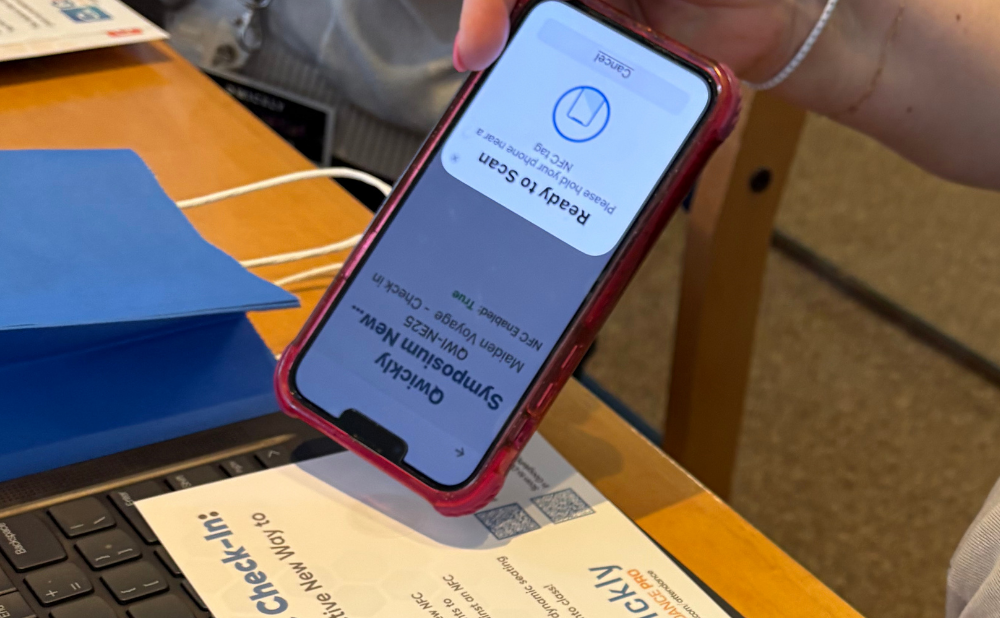
Using NFC capabilities in Qwickly Attendance Pro, students can check in to class with just the tap of their phone. Instructors can either place one NFC tag at the entrance of the classroom or set up a tag at each individual seat, giving schools the flexibility to choose the check-in experience that works best for their space. Attendance is recorded automatically the moment a student taps in — no scanning a roster, no calling names, no interrupting class time. To learn more about setting up NFC check-in, please refer to our latest Knowledge Base.
We are assembling a small group of institutions to help shape Automated Check-In before general release. Tell us a little about your campus and we will be in touch with next steps.

Thanks for your interest in the Automated Check-In Beta. We will follow up with details on timing and what participation involves.
There are multiple ways to get NFC tags connected to Qwickly Location Manager. Pilot NFC Check-In for $1,000 for a full semester, including 50 NFC tags.
Pre-configured NFC tags, ready to connect to your Qwickly Location Manager account right out of the box. No setup required — just place them and go.
| 100 tags | $250 |
| 250 tags | $500 |
| 1,000 tags | $1,500 |
Already have NFC tags, or prefer to source your own? Qwickly Location Manager works with your existing tags as long as they meet the required specifications.
Full specification list coming soon.
Watch one of our recorded webinars right now.
| DESCRIPTION | AUDIENCE |
|---|---|
|
Introducing Automated Check-In for Qwickly Attendance
This webinar explores Qwickly Attendance's newest automated check-in feature, which leverages near-field communication (NFC) technology to revolutionize presence verification without faculty intervention. Attendees will learn how to transition away from manual roll calls by setting up NFC tags at classroom entrances or individual desks.
|
Blackboard, Canvas and D2L Brightspace system admins, academic leadership, faculty
|
Populate the entire semester course schedule institution-wide. Learn More

Enterprise reporting summarizes daily attendance for proactive intervention, assisting student retention. Learn More

Campus staff with a stake in student success receive student group reports relevant to operational needs. Learn More.
Student Profile aggregates progress on assignments, quizzes, and other LMS activity from a course. Learn More

Instructor commenting and integrated LMS grading provides immediate feedback to students. Learn More

Set a specific number of sessions a student can be absent before being categorized as reaching the absence limit. Learn More

Review a variety of specific trends & data points, such as students who have never attended a course, not attended since a selected date, or have more than a certain number of absences. Learn More
Track in-class time automatically with status-based time tracking. Learn More